
One UI 8 5 Introduces Private Album Feature to Galaxy Gallery App
Samsung has finally addressed a long-standing request from Galaxy users by adding a new way to hide sensitive photos and videos directly within the Gallery app. Until now, the only method to keep private media hidden was by moving files into the Secure Folder. While effective, this approach was inconvenient because it required storing photos and videos in a separate, sandboxed space. Users had to move files out of the Secure Folder to interact with them and then move them back in to keep them protected.
With the release of One UI 8 5, Samsung is changing this by introducing the Private Album feature in the Gallery app. This new option offers a much simpler and more integrated way to keep personal media out of sight without needing to use the Secure Folder. The Private Album is designed to provide privacy while allowing easier access and management of hidden photos and videos.
How the Private Album Works in One UI 8 5
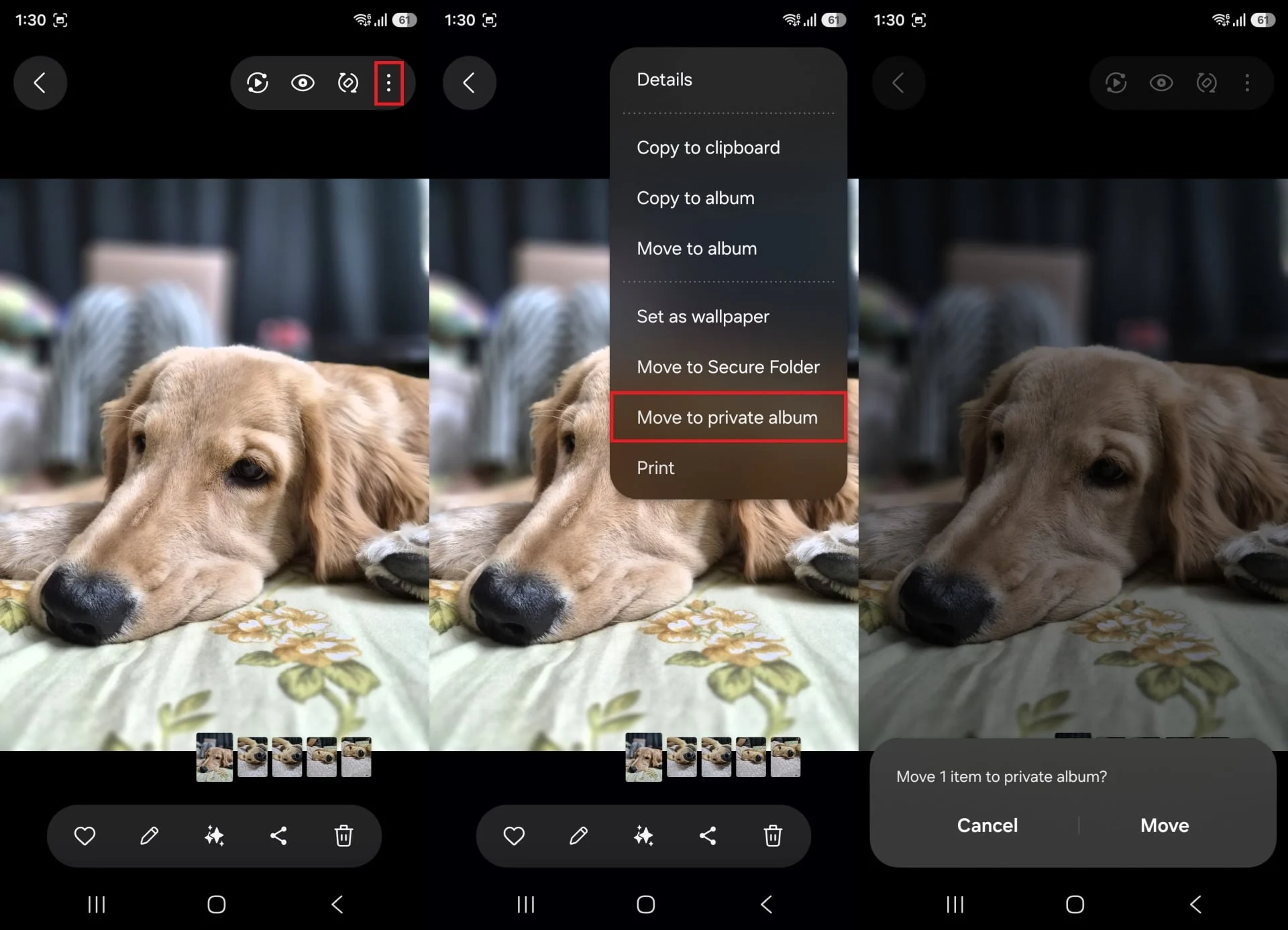
Using the Private Album in One UI 8 5 is straightforward. To move any image or video into the Private Album, open the file, tap the More (⋮) menu, and select “Move to private album.” Users can also select multiple items at once and move them together into the Private Album, making it convenient to secure several files quickly.
Once files are moved, the Private Album can be accessed from the Gallery app’s home screen by tapping the Menu button. To unlock the Private Album, users must authenticate using their fingerprint or whichever screen lock method they have set up on their device. For added security, Samsung disables screenshots inside the Private Album, ensuring that private media cannot be captured or shared unintentionally.
Current Features and Future Potential of One UI 8 5 Private Album
At present, the Private Album offers basic functionality. Users can share files, move them back out of the album, or delete them as needed. Media inside the Private Album is organized strictly by date, and there are no additional sorting or categorization options available yet.
While the feature is currently minimalistic, Samsung may expand its capabilities over time. The key improvement is that the Gallery app now natively supports keeping photos and videos private without relying on the Secure Folder. This native integration simplifies the process and enhances user convenience.
The Private Album feature will become available once your Galaxy phone or tablet is updated to One UI 8 5. This update marks an important step forward in how Samsung handles media privacy on its devices, giving users a more seamless and secure way to protect their personal photos and videos.
For more stories on this topic, visit our category page.
Source: original article.